
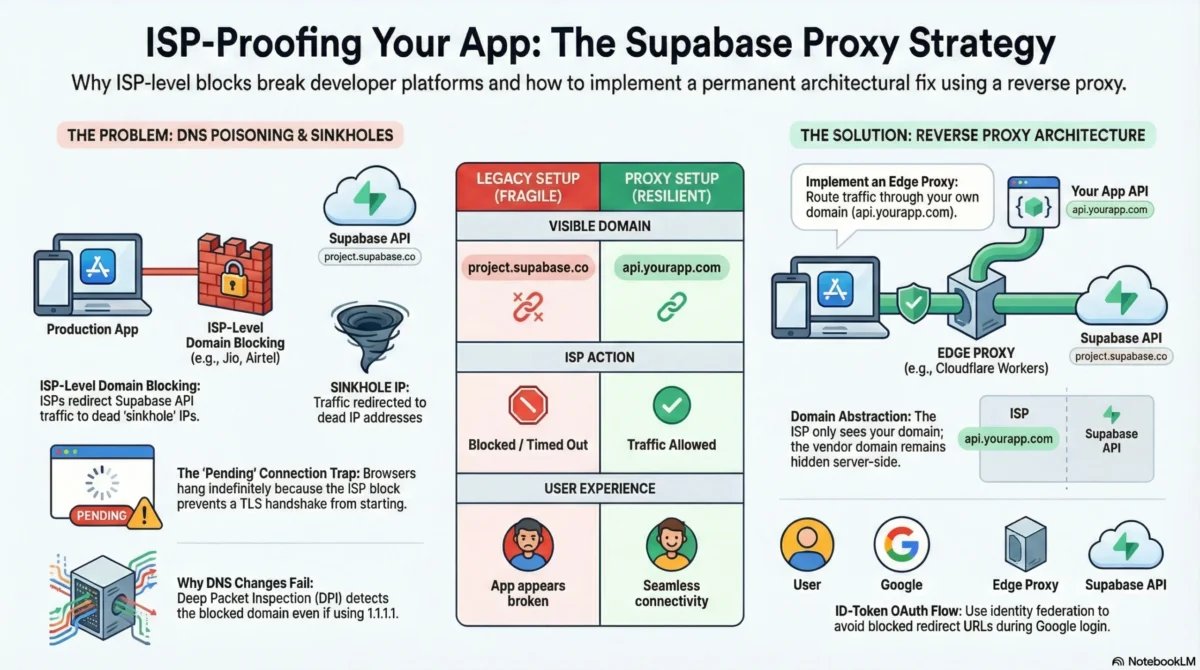
On February 24, 2026, developers across India woke up to broken apps. Supabase APIs were timing out on Jio, Airtel, and ACT Fibernet, while everything else seemed normal. No deployments, no outages, just confused users and failing logins. This is what actually happened, why the usual fixes don’t work, and how to get your app running again in minutes.
If you’re using Supabase in India, you’ve probably heard this from users:
“Supabase is down”
“Google login isn’t working”
“The app just keeps loading”
“Nothing works on Jio / JioFiber”
But when you checked:
- Supabase status page → green
- Supabase dashboard → accessible
- Logs → normal
- VPN → everything works
- Airtel Wi-Fi → works
- Office network → works
Only Jio / JioFiber users were broken.
This wasn’t an app bug.
This wasn’t a Supabase outage.
This wasn’t a deployment issue.
It was ISP-level blocking of *.supabase.co.
At TechVitara, we have tasted some of the best alternatives. So let’s have a look this guide.
What actually happened?
Indian ISPs began blocking the API domain:
*.supabase.co
Not the marketing site:
supabase.com
This is critical:
- You could still log into the Supabase dashboard
- You could still manage projects
- You could still see logs
- But production apps could not reach the API
Every browser call to:
https://<project>.supabase.co/auth/v1/*
https://<project>.supabase.co/rest/v1/*
https://<project>.supabase.co/storage/v1/*
https://<project>.supabase.co/functions/v1/*
Either:
- Hung forever
- Timed out
- Failed with
ERR_CONNECTION_TIMED_OUT - Stayed in
pendingin DevTools
Which ISPs were affected?
Confirmed blocks:
- Reliance Jio – mobile + JioFiber
- Bharti Airtel – broadband + mobile
- ACT Fibernet – multiple regions
Reports also emerged from BSNL and Vi users.
This meant hundreds of millions of users could not access Supabase-backed apps.
The technical root cause: DNS poisoning + sinkhole IPs
The block is implemented at the DNS layer.
Instead of resolving:
myproject.supabase.co → Supabase real IP
ISPs returned a sinkhole IP:
myproject.supabase.co → fake IP → dead endpoint
So the flow became:
Browser → fake IP → no response → timeout
No TLS handshake.
No HTTP error.
Just hanging connections.
This is why:
- VPN works
- Other networks work
- Supabase infrastructure is healthy
- But production users are broken
Why common “fixes” don’t work?
❌ Changing DNS to 1.1.1.1 / 8.8.8.8
Sometimes works locally, fails in production because:
- DPI (Deep Packet Inspection) still sees
*.supabase.coin SNI - Mobile networks override DNS
- Users won’t change DNS
- ISPs intercept DoH
❌ VPN
Not viable for production:
- User friction
- Latency
- Cost
- Trust issues
- Not transparent
❌ Waiting for the block to lift
These blocks can last weeks or months.
You need an infrastructure-level fix.
The real solution: Hide Supabase behind your own domain
This is the only production-grade fix:
Stop exposing
*.supabase.coto the browser entirely.
Instead:
Browser → api.yourapp.com → Cloudflare Worker → Supabase
New architecture
Client
  |
  | HTTPS (your domain)
  v
api.yourapp.com   (Cloudflare Worker proxy)
  |
  | HTTPS (server-side, not visible to ISP filtering)
  v
<project>.supabase.co
From the ISP’s perspective:
- The browser only talks to
yourapp.com - OAuth only talks to
accounts.google.com - No
supabase.coever appears in the browser
So the ISP block becomes irrelevant.
Why this works?
ISP blocks target domains, not platforms.
They block:
*.supabase.co
They do NOT block:
api.yourapp.com
Once Supabase is behind your domain:
- DNS poisoning no longer applies
- SNI inspection no longer sees supabase.co
- TLS handshake succeeds
- Traffic flows normally
What is the Production architecture pattern?
This is a standard reverse-proxy isolation pattern:
- Cloudflare Worker as API gateway
- Supabase as backend service
- Your domain as the public interface
- Zero trust boundary at the edge
Same pattern used by:
- API gateways
- Zero-trust proxies
- Enterprise API meshes
- Edge security architectures
Step 1: Put Supabase behind a Cloudflare Worker
Browser
https://api.yourapp.com/rest/v1/...
Worker
forwards → https://<project>.supabase.co/rest/v1/...
Supabase never becomes visible to the client.
Step 2: Proxy responsibilities
Your Worker must handle:
- Auth forwarding
- JWT preservation
- CORS
- Headers
- API versioning
- IP forwarding
- Storage uploads
- Edge functions
- Realtime compatibility (if needed)
This is infrastructure, not frontend logic.
Step 3: Google OAuth must be fixed separately
Even with proxying, Supabase’s default Google OAuth breaks.
Why?
Default flow:
Browser → Supabase OAuth
Supabase → Google
Google → <project>.supabase.co/auth/v1/callback   ❌ blocked
That final redirect hits supabase.co, which is blocked.
So Google login still fails on Jio.
The correct OAuth model: ID-Token flow
Instead of Supabase-hosted redirects:
Browser → Google
Google → yourapp.com/auth/google
yourapp.com → Supabase (via proxy)
So the browser only ever talks to:
yourapp.comaccounts.google.com
Never supabase.co.
This is identity token federation, not hosted OAuth redirect.
Correct web auth architecture
Browser → accounts.google.com
Google → yourapp.com/auth/google
yourapp.com → api.yourapp.com/auth/v1/token
Worker → supabase.co/auth/v1/token
Resulting system properties
✅ Works on Jio
✅ Works on Airtel
✅ Works on ACT
✅ Works on mobile networks
✅ Works without VPN
✅ No DNS hacks
✅ No user configuration
✅ Free tier compatible
✅ Production safe
✅ Scalable
✅ Secure
✅ ISP-agnostic
Email magic links: the one limitation
Supabase’s built-in email links use:
https://<project>.supabase.co/auth/v1/verify
Those links will still fail on blocked ISPs.
Solutions:
Option A — Supabase Custom Domain
Use Supabase’s official custom domain feature so emails use:
auth.yourapp.com
Option B — Full custom auth
- Send your own emails (Resend/Sendgrid/etc.)
- Use your own domain links
- Verify tokens via API/Edge Functions
This is the only part that cannot be solved by proxy alone.
Why this approach scales?
This is not a hack.
This is proper API architecture.
You gain:
- Domain control
- API abstraction
- ISP independence
- Vendor isolation
- Edge security
- Traffic governance
- Observability
- Rate limiting
- Zero-trust enforcement
- Infrastructure sovereignty
You are no longer coupled to a third-party domain at the network layer.
TechVitara Strategic takeaway
This incident exposed a deeper truth:
Modern SaaS apps should never expose vendor infrastructure domains directly to browsers.
Whether it’s Supabase, Firebase, Stripe, or any API platform:
- Direct browser → vendor domain creates hard coupling
- ISP filtering breaks apps
- CDN issues propagate to UX
- DNS poisoning breaks production
- Geopolitical blocks break regions
API abstraction is not optional anymore.
It’s a reliability requirement.
Final architecture model (production grade)
Client Layer
  |
  v
Your Domain (API Gateway / Edge Proxy)
  |
  v
Vendor Services (Supabase, APIs, services)
This is how resilient systems are built.
Conclusion
Supabase isn’t broken. Your app isn’t broken. Your code isn’t broken.
The internet infrastructure layer is broken.
And the fix is architectural, not operational.
By:
- Hiding Supabase behind your own domain
- Using an edge proxy (Cloudflare Worker)
- Switching Google OAuth to ID-token flow
- Removing direct
supabase.coexposure - Controlling your network boundary
You make your app:
- ISP-proof
- Region-proof
- Vendor-independent
- Production-grade
- Resilient by design
This isn’t just a fix for Jio.
It’s a future-proof infrastructure pattern.
If your browser can see
*.supabase.co, your app is fragile.
If your browser only sees your domain, your app is resilient.
FAQs on Supabase:
Is Supabase (or Firebase) actually banned in India?
No, neither Supabase nor Firebase is officially “banned.”
What’s happening is network-level blocking of specific API domains, not platform bans. In Supabase’s case, ISPs are blocking *.supabase.co, which breaks apps even though Supabase itself is fully operational.
Is Supabase still blocked in India?
Yes, as of the latest reports, the block is still active on major networks like Jio, Airtel, and ACT Fibernet. There’s no official timeline for removal, which is why relying on waiting is risky. Infrastructure-level fixes (like proxies) are currently the only reliable solution.
Will changing DNS to 1.1.1.1 or 8.8.8.8 fix it?
Sometimes for developers. Almost never for real users.
It might help local testing on some networks, but it’s not a production solution:
Many ISPs use DPI (Deep Packet Inspection)
Mobile networks often override DNS
End users won’t change DNS
Some ISPs intercept public DNS traffic
It’s a workaround, not a fix.
Does using a proxy reduce Supabase security?
No. Not at all.
A proxy doesn’t change your security model, it just changes the network path.
Your RLS policies, auth rules, JWT validation, API keys, and permissions still apply exactly the same way. Supabase remains the security authority, the proxy just forwards traffic.
Can I host my own proxy instead of using a service?
Yes, absolutely.
You can self-host a Cloudflare Worker proxy and fully control your infrastructure.
This gives you:
Full domain control
Zero vendor lock-in
No third-party dependency
Managed solutions just save setup time and add features like analytics and WebSocket support.
Which Supabase features work through a proxy?
Everything:
Auth
Database REST (PostgREST)
Storage
Edge Functions
GraphQL
Realtime (WebSockets, subscriptions, presence, broadcast)
From your app’s perspective, nothing changes except the API URL.
Will this break existing Supabase SDKs?
No.
The Supabase client doesn’t care what domain it talks to, it just sends HTTP/WebSocket requests.
You only change the URL. Everything else stays the same.






Comments are closed.